


tvOS 27.2: 7 New Apple TV Features You Should Try Right Now
Apple has released tvOS 27.2, bringing several useful improvements to Apple TV 4K. While this isn't a major software redesign, the update introduces new screen saver options, improved FaceTime features, better remote tracking and additional accessibility tools.
The update arrived alongside iOS 27.2 and macOS 27.2. Interestingly, Apple skipped tvOS 27.1 entirely, making this the first major update since tvOS 27 launched in September.
If you own an Apple TV 4K, there are several new features worth exploring. Here are seven changes that could make your entertainment experience more convenient.
1. Shuffle Between Different Screen Savers
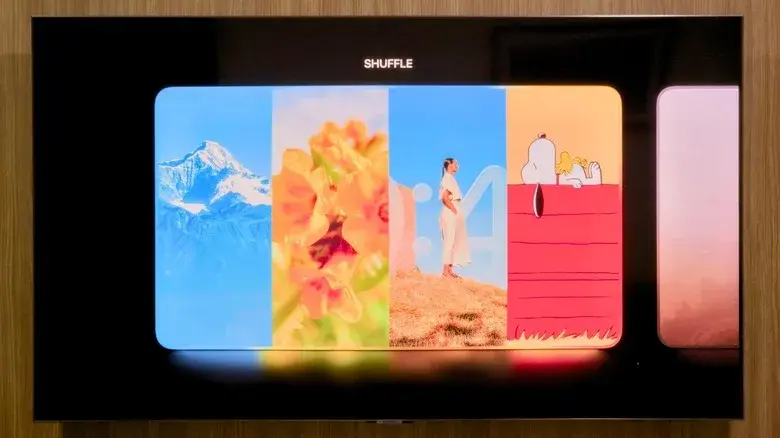
One of the most noticeable additions in tvOS 27.2 is the new Shuffle option for screen savers.
Previously, Apple TV users had to select one screen saver category, such as Aerials, Memories, Portraits or Snoopy.
The new option removes that limitation.
With Shuffle enabled, Apple TV automatically switches between supported screen saver categories whenever the screen saver activates.
This means you can enjoy beautiful aerial footage one time and see family photos or Snoopy animations the next.
It is a small improvement, but it makes Apple's already attractive screen saver experience more interesting.
2. Choose Specific Photos From Your iPhone
Apple has also improved how users manage personal photos on their Apple TV.
With tvOS 27.2, you can select specific pictures from your iPhone for use in supported screen saver categories.
Previously, sharing photos with Apple TV could involve giving the device access to a much larger portion of your photo library.
The new approach gives users more control over which pictures appear on their television.
This is particularly useful for families and people who share their Apple TV with others.
You can choose the photographs you actually want displayed without making your entire photo collection available on the television.
3. FaceTime Links Make Joining Calls Easier
FaceTime is receiving another useful improvement with tvOS 27.2.
Apple now supports FaceTime links, making it easier to join calls directly from Apple TV.
Instead of relying entirely on the traditional calling process, users can open a shared FaceTime link and connect to a conversation from their television.
However, Apple TV still relies on an iPhone's camera through the Continuity Camera feature.
This means you need a compatible iPhone to provide the video and microphone functionality.
The larger television screen makes FaceTime more convenient for family conversations and group calls.
4. New Sign Language and Live Captioning Support
Accessibility is another area receiving attention in this update.
Apple has added support for third-party sign language interpreters and live captioning services during FaceTime calls.
The update also introduces American Sign Language (ASL) and British Sign Language (BSL) support for selected movies and television shows in the Apple TV app.
Users can enable supported options through the video player's controls or the device settings.
These additions can make entertainment and video conversations more accessible to people who rely on sign language or captions.
Availability depends on the supported content and services.
5. Find Your Siri Remote Using the Find My App
Losing the Apple TV remote between sofa cushions is a familiar problem.
Apple is making it easier to locate a missing Siri Remote with improved Find My integration.
With tvOS 27.2, supported Siri Remotes can appear in the Find My app on an iPhone.
This makes finding the remote more convenient because users no longer need to rely exclusively on the Apple TV Remote control in iPhone's Control Center.
There is an important hardware distinction, however.
Basic Find My support works with the second-generation Siri Remote and newer models, while Precision Finding and the remote's built-in speaker require the newer fourth-generation remote.

6. Apple TV Profiles Now Sync With iPhone and iPad
Apple has also improved the experience for households where multiple people share the same television.
With iOS 27.2, profiles in the Apple TV app are available on iPhone and iPad and synchronize with Apple TV.
This allows users to maintain a more consistent viewing experience across their devices.
Apple has also introduced additional characters for profile selection, including options from popular children's entertainment.
For families, individual profiles can make it easier to keep watchlists and entertainment preferences separate.
This is especially useful when children and adults use the same Apple TV.
7. Apple Music Gets a New Look
The Apple Music application has received a visual update as part of Apple's latest design changes.
The most noticeable difference is its redesigned black-and-white app icon, which matches the updated appearance introduced on other Apple devices.
There are also smaller interface adjustments designed to bring the experience in line with Apple's refreshed branding.
Although this isn't a major functional upgrade, it gives Apple TV a more consistent appearance across the company's software ecosystem.
How to Download and Install tvOS 27.2
Installing the latest Apple TV software is straightforward.
Follow these steps:
- Turn on your Apple TV.
- Open the Settings application.
- Select System.
- Choose Software Update.
- Select Update Software.
- If tvOS 27.2 is available, follow the on-screen instructions.
The update is free.
Apple lists the second-generation Apple TV 4K and newer models as compatible with tvOS 27.2. Older Apple TV models do not receive this version.
Should You Install tvOS 27.2?
If you own a compatible Apple TV 4K, updating is worthwhile.
The new screen saver controls provide more customization, while improved FaceTime integration and Find My support make everyday use more convenient.
The additional accessibility options are also an important improvement for users who need them.
However, not every feature is available on every Apple TV model. Some advanced capabilities require newer hardware, including the latest Siri Remote and fourth-generation Apple TV 4K.
Overall, tvOS 27.2 is a useful refinement rather than a complete transformation. It focuses on improving existing Apple TV features while making the entertainment experience more personalized and accessible.
Leave a comment
Your email address will not be published. Required fields are marked *