

Microsoft May Have Finally Fixed One of Windows 11’s Biggest Copilot Problems
Microsoft appears to be changing its approach to Copilot in Windows, and the latest updates suggest the company may finally be addressing one of the biggest complaints surrounding its AI strategy.
After years of pushing Copilot deeper into Windows, Microsoft is now focusing on making the assistant more useful while giving users greater control over how AI interacts with their computers.
The shift comes as Microsoft rolls out Windows 11 26H2 and prepares a new generation of AI-powered Windows features.
Microsoft Is Taking a More Careful Approach to Copilot
Microsoft's initial Copilot strategy involved placing the AI assistant throughout Windows and several built-in applications.
However, the company later began reducing some of those integrations. In March 2026, Microsoft announced that it would scale back Copilot integrations in applications including Photos, Widgets, Notepad and Snipping Tool, saying it wanted to focus AI where it provides meaningful value.
That change suggested Microsoft was listening to users who felt Windows was becoming overloaded with unnecessary AI features.
Now, the company's latest developments show a broader attempt to make Copilot more practical rather than simply more visible.
Windows 11 Is Becoming More User-Friendly
The latest Windows updates include several improvements unrelated to AI that are designed to make the operating system more predictable and easier to use.
Microsoft has introduced improvements to File Explorer, touchpad controls, system reliability and other everyday features. One particularly useful change allows users to remap the dedicated Copilot key on supported keyboards.
Instead of being locked to Copilot, the key can be configured as Right Ctrl or the Context Menu key.
For users who rarely use Copilot, this makes the dedicated hardware button considerably more useful.
Microsoft Is Giving Copilot More Real Control
At its latest Windows and Surface event, Microsoft demonstrated a much more capable version of Copilot.
The company's new Hybrid Intelligence approach combines cloud-based AI with models running directly on the PC. This allows Copilot to choose where a task should be processed depending on factors such as complexity, cost and privacy.
In one demonstration, Microsoft's AI agent was asked to prepare documents for an accountant.
The system searched through folders on the computer, located relevant files, renamed them, created a ZIP archive and prepared an email containing the files.
That's a significant difference from simply asking an AI chatbot a question.
Copilot Could Become More Like a Windows Assistant
The demonstration suggests Microsoft's long-term goal is to turn Copilot into an assistant capable of actually performing tasks inside Windows.
Instead of telling users how to find a file or change a setting, Copilot could increasingly perform those actions itself.
Microsoft says these Hybrid Intelligence capabilities are expected to roll out to Copilot over the coming months.
This could make Copilot substantially more useful for everyday Windows users.
New Windows Search Is Also Getting Smarter
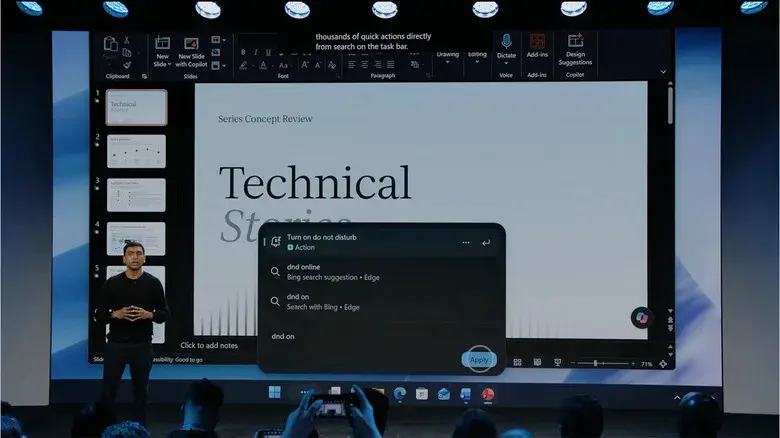
Microsoft is also upgrading Windows Search.
The new search experience can perform certain actions directly from the search interface. Examples include changing settings such as dark mode, adjusting microphone volume and even sending text messages.
The idea is to reduce the number of menus users need to navigate.
Instead of opening Settings and searching through different sections, users may eventually be able to type what they want directly into Windows Search.
Local AI Could Make Copilot Faster and More Private
Another major part of Microsoft's strategy is moving more AI processing onto Windows PCs.
The company has introduced new technology that allows powerful AI models to operate locally on sufficiently capable hardware. Microsoft's Copilot can use a hybrid approach, sending difficult tasks to the cloud while handling suitable workloads directly on the computer.
Local processing could provide several advantages.
It can potentially reduce cloud computing costs, improve responsiveness and keep certain sensitive information on the user's device.
Microsoft is also introducing Microsoft Execution Containers, designed to provide security boundaries for AI agents operating on Windows PCs.
The Problem: Powerful AI PCs Are Expensive
There is, however, a major obstacle to Microsoft's local-AI vision: hardware prices.
Microsoft's new Surface Laptop Ultra starts at $2,599, while high-end configurations can cost considerably more. The machine is designed to provide enough local computing power for demanding AI workloads.
That could limit local AI to developers, professionals and enthusiasts who can afford expensive hardware.
Microsoft's challenge is therefore not simply making AI work locally. It also needs to make powerful AI hardware affordable enough for ordinary consumers.
Microsoft Is Finally Learning From Copilot's Early Problems
The company's current strategy represents a notable change from the early Copilot+ PC push.
Microsoft initially promoted AI as one of the defining features of its next generation of Windows computers. However, several features faced delays and privacy concerns, while many users questioned whether they actually needed AI integrated into every part of Windows.
Microsoft now appears to be taking a more measured approach.
Rather than making Copilot unavoidable, the company is increasingly focused on useful automation, better controls, stronger security and practical AI assistance.
Is Windows 11 Finally Getting Better?
It's too early to say Microsoft has completely solved Windows 11's long-running problems.
The operating system still has areas that users criticize, including parts of the Start menu and performance on lower-end hardware. But Microsoft's recent updates suggest that the company is paying more attention to reliability and everyday usability.
The biggest improvement may be philosophical: Microsoft seems to be moving away from the idea that adding AI everywhere automatically makes Windows better.
Instead, AI is becoming a tool that is supposed to solve actual problems.
Final Thoughts
Microsoft's latest Copilot and Windows developments could represent the beginning of a better AI experience for Windows users.
The combination of local and cloud AI, smarter Windows Search, more capable agents and improved control over Copilot has the potential to make the operating system significantly more useful.
The key will be execution.
If Microsoft can make these features reliable, secure and unobtrusive, Copilot may finally become the Windows assistant the company originally envisioned—without forcing users to interact with AI every time they use their PC.
Tinggalkan komentar
Alamat email Anda tidak akan dipublikasikan. Kolom yang wajib diisi ditandai *