

iPhone Duo Users Face a Display Zoom Problem That Could Require a Factory Reset
Apple's first foldable smartphone, the iPhone Duo, is already attracting attention for its innovative design, but early users are reportedly encountering several problems. From screen durability concerns to limited app optimisation and accessory compatibility, the device's initial experience has not been entirely smooth.
Now, another software-related issue has emerged. Some iPhone Duo users have discovered that Apple does not provide the usual Display Zoom setting after the initial device setup. This means users who want to change the overall size of icons and interface elements later may have to erase their device and configure it again.
The issue was highlighted in a report by MacRumors after users noticed that the familiar Display Zoom option was missing from the phone's Appearance settings. The publication also confirmed the omission on a demo unit running iOS 27.2.
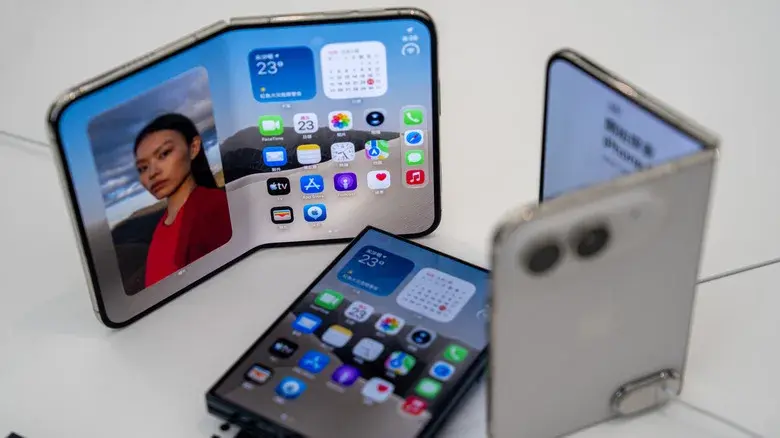
iPhone Duo Is Missing the Display Zoom Setting
Display Zoom is a useful iPhone feature that allows users to adjust the size of interface elements across the screen. It offers two main choices: Default and Larger Text.
When enabled, the Larger Text option makes icons, menus and other interface elements appear bigger, making the device easier to use for people who prefer a larger display layout.
However, iPhone Duo owners reportedly cannot access this setting after completing the initial setup process.
According to the report, the issue was first noticed by a Reddit user while exploring a demo iPhone Duo. Another user subsequently reported the same behaviour, suggesting that the missing option may not be limited to a single device.
The absence of Display Zoom is particularly unusual because other iPhone models generally provide access to this setting after setup.
Users Can Select Display Sizes During Initial Setup
Although the Display Zoom option disappears after setup, the iPhone Duo reportedly allows users to select their preferred interface size during the initial configuration process.
The available choices include:
Default: Uses the standard interface size.
Medium: Provides a larger interface than the default setting.
Large: Makes interface elements more prominent and easier to see.
The problem is that users cannot return to this selection screen through the normal settings menu once the setup process is complete.
This creates an inconvenience for anyone who initially selects the wrong display size or decides to change their preference after using the device for a few days.
For example, someone who chooses the Default option during setup may later decide that larger icons and menus would be more comfortable. On other iPhone models, changing Display Zoom is relatively straightforward, but iPhone Duo users reportedly do not have the same flexibility.
Changing Display Zoom May Require Resetting the iPhone Duo
The biggest concern is the workaround currently available to users who want to change their display size.
Based on the reported behaviour, the only available option is to reset the iPhone Duo and select a different display size during the initial setup process.
This can be frustrating, particularly for people who have already installed applications, configured accounts and customised their device.
A factory reset removes personal data and settings from the device. Although users can restore their information from an iCloud or computer backup, the process still requires time and effort.
After restoring a backup, users may also need to sign in to certain applications again, verify accounts and adjust individual settings.
Therefore, resetting the device simply to change an interface preference is far from an ideal solution.
Text Size and Accessibility Settings Are Still Available
The missing Display Zoom option does not mean Apple has removed every way to make content easier to see.
The iPhone Duo reportedly still provides options to increase font size through its Appearance and Accessibility settings.
Users can explore these options to improve readability without resetting their smartphones.
Here are some useful settings:
Text Size: Increase the size of text displayed in supported applications.
Larger Accessibility Sizes: Enable additional font-size options.
Bold Text: Make text easier to distinguish.
Display and Text Size: Adjust other visual settings to improve readability.
However, these features do not provide exactly the same experience as Display Zoom. Increasing font size mainly affects text, whereas Display Zoom changes the overall scale of the interface, including icons and other visual elements.
Apple provides additional information through its official support pages:
iPhone Duo Is Already Facing Other Early Problems
The missing Display Zoom setting adds to a growing list of reported concerns surrounding Apple's first foldable iPhone.
Some early users have raised questions about screen durability, while others have highlighted the limited number of applications optimised for the foldable display.
Accessory compatibility is another concern. The iPhone Duo's shorter design reportedly limits its compatibility with certain MagSafe accessories designed for conventional iPhone models.
Meanwhile, stock shortages have reportedly pushed delivery estimates into 2027 for some customers.
These issues do not necessarily mean every iPhone Duo owner will experience problems. However, they highlight the challenges Apple faces when introducing a completely new smartphone design and adapting iOS to a different form factor.
Will Apple Fix the Missing Display Zoom Option?
Apple has not officially commented on the missing Display Zoom setting, and there is currently no confirmed timeline for a fix.
Since the issue appears to involve software behaviour rather than a confirmed hardware limitation, Apple could potentially address it through a future iOS update.
However, it remains unclear whether the company plans to restore the full Display Zoom controls or introduce a different method for changing interface sizes.
For now, iPhone Duo owners should carefully select their preferred display size during the initial setup process. Anyone planning to purchase the device may also want to consider which interface size will be most comfortable for everyday use.
Final Thoughts
The missing Display Zoom option may seem like a relatively small software issue, but it could become a significant inconvenience for iPhone Duo owners.
The feature is especially useful for people who prefer larger icons, menus and interface elements. Removing access to it after initial setup makes a simple display adjustment unnecessarily complicated.
Although users can still increase text size through Accessibility settings, these alternatives do not fully replace Display Zoom.
Apple has yet to confirm whether a software update will resolve the problem. Until then, choosing the correct display size during the initial setup appears to be the safest approach for anyone using the iPhone Duo.
Leave a comment
Your email address will not be published. Required fields are marked *