

One Developer Uses AI to Recreate 7 Adobe Apps for Free
A software developer has introduced an ambitious project designed to recreate seven popular Adobe applications using artificial intelligence. The project, called ArtCraft, aims to provide free, open-source alternatives to tools used for photo editing, video production, graphic design, desktop publishing, and PDF management.
Developer Brandon Thomas says he used Anthropic’s Claude Opus 5.5 AI model to help build the applications in Rust, a programming language known for performance and memory safety. The project has attracted attention because it attempts to reproduce the core functions and familiar interfaces of software that traditionally requires paid subscriptions.
Although the concept could appeal to users looking for alternatives to Adobe Creative Cloud, the applications are still under development and are not yet full replacements for professional creative software.
What Is ArtCraft?
ArtCraft is a collection of applications intended to perform tasks similar to those handled by Adobe’s major creative tools. Rather than developing a single editing program, the project covers several areas of digital creativity.
The seven applications are:
- PhotoCraft: An image-editing alternative inspired by Adobe Photoshop.
- VectorCraft: A vector graphics tool similar in purpose to Adobe Illustrator.
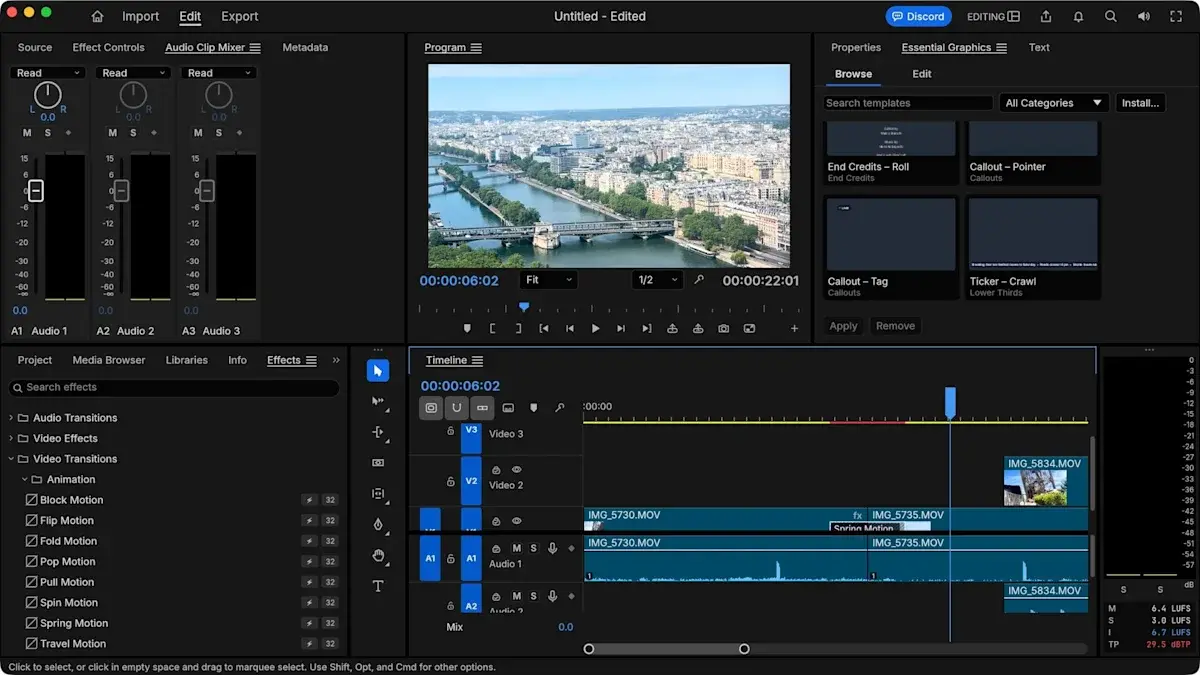
- FilmCraft: A video-editing application targeting workflows associated with Adobe Premiere Pro.
- LightCraft: A photo organization and editing tool comparable in concept to Adobe Lightroom.
- EffectCraft: A tool designed for visual effects and motion graphics similar to Adobe After Effects.
- DesignCraft: A desktop publishing application intended for layouts and page design, like Adobe InDesign.
- PrintCraft: A PDF-focused application designed to cover tasks associated with Adobe Acrobat Pro.
The goal is to offer a collection of tools that can handle common creative tasks without requiring users to pay for Adobe subscriptions.
How AI Helped Build Seven Applications
According to Thomas, AI-assisted development played a central role in creating ArtCraft. He used Claude Opus 5.5 to help generate and develop code, while Rust served as the main programming language.
This approach reflects the growing popularity of AI-assisted programming, sometimes called vibe coding. Developers describe what they want to build, use AI to generate or modify code, and then test and refine the results.
AI coding assistants can speed up repetitive programming tasks, help implement features, and make it easier to create prototypes. They do not automatically guarantee that an application will be secure, reliable, or ready for professional use.
Complex creative software still requires extensive testing, particularly for file compatibility, rendering, audio and video processing, performance, and project recovery.
ArtCraft illustrates both sides of AI-assisted development: the technology can accelerate ambitious projects, but producing a dependable application involves much more than generating code.
Can ArtCraft Replace Adobe Photoshop?
PhotoCraft is intended to provide an alternative to Photoshop for image-editing tasks. Its familiar tools and interface may make it easier for users to understand how the application is supposed to work.
However, early hands-on testing reported by TechRadar found important limitations. Some selection and object-manipulation tools behaved inconsistently, and saving a project as a JPEG did not preserve the editable structure expected from a professional image-editing workflow.
That distinction matters. JPEG is useful for sharing finished images, but it does not retain all the layers, masks, and editable elements associated with a layered project file.
Professional designers often need to revisit projects, adjust individual elements, and export files in multiple formats. Until PhotoCraft supports dependable editing workflows and suitable project-file handling, it should be considered an experimental option rather than a complete Photoshop replacement.
What About Video Editing and Other Creative Tools?
FilmCraft aims to reproduce parts of the video-editing experience associated with Adobe Premiere Pro. The broader ArtCraft collection also targets vector graphics, photo cataloguing, visual effects, page layouts, and PDF-related work.
Early testing has highlighted performance problems and missing capabilities in some applications. TechRadar's review, for example, reported difficulties with video playback and audio in FilmCraft, alongside sluggish performance on the test machine.
These limitations are important for anyone working on commercial projects. Video editors need dependable playback, broad codec support, stable timelines, accurate audio, and reliable exports. Graphic designers and publishers similarly depend on precise controls and predictable file compatibility.
The project may improve as development continues, but users should test the specific features they need before relying on any of these tools for important work.
Is ArtCraft Really Free and Open Source?
One of ArtCraft's main attractions is its open-source approach. Thomas has presented the applications as free alternatives, with source code available for users and developers to inspect and modify under the project's licensing terms.
Open-source software can provide greater transparency and flexibility than closed commercial applications. Users may be able to examine the code, contribute fixes, adapt the software, or maintain their own versions, depending on the applicable license.
Nevertheless, free software is not automatically equivalent to a mature commercial product. Development, documentation, maintenance, compatibility testing, and user support all require time and resources.
Users should check the project's official repositories for the current source code, license for each component, installation instructions, and release status before installing the software.
Could ArtCraft Challenge Adobe Creative Cloud?
ArtCraft raises an interesting question about the future of creative software: could AI make it much easier for small teams or individual developers to build alternatives to established applications?
Adobe's products have been developed over many years and are supported by extensive ecosystems of plugins, tutorials, file formats, and professional workflows. Reproducing their interfaces and basic tools is only one part of the challenge.
A credible replacement must also handle complex projects reliably, support common formats, deliver consistent performance, and receive ongoing updates.
If ArtCraft develops successfully, it could give hobbyists, students, and independent creators additional choices. However, professionals who depend on mature workflows may prefer established tools until the alternatives demonstrate comparable stability and feature coverage.
Other free or lower-cost creative applications are also available, including GIMP for image editing, Inkscape for vector graphics, and DaVinci Resolve for video production. Each has its own capabilities and limitations, but they may be more practical options for users who need established tools today.
What Users Should Know Before Trying ArtCraft
Anyone interested in testing ArtCraft should approach it as an early-stage project.
Before using it for important work, consider these precautions:
- Back up your files. Keep original projects safe before opening or editing them in experimental software.
- Test export formats. Confirm that your chosen application can save files in the formats your workflow requires.
- Check system compatibility. Review the latest requirements and installation guidance for Windows, macOS, Linux, or browser-based versions.
- Evaluate stability. Test the features you use most frequently before committing a large project to the application.
- Review the source and license. Download software from official project sources and understand the terms under which it is distributed.
These precautions can help users explore new software without risking important files or interrupting their regular creative work.
Conclusion
ArtCraft is an ambitious attempt to use AI-assisted programming to create free, open-source alternatives to seven major Adobe applications. Built with help from Claude Opus 5.5 and written in Rust, the project demonstrates how AI tools can help developers pursue complex software ideas.
However, early reports indicate that the applications still have bugs, performance issues, and missing features. They are not yet dependable replacements for every professional Adobe workflow.
For users interested in the future of AI-generated software, ArtCraft is a project worth watching. For now, anyone considering it for serious creative work should test it carefully and keep reliable alternatives available.
Sources:
Leave a comment
Your email address will not be published. Required fields are marked *