


Google is making Android app development more flexible by allowing developers to use third-party artificial intelligence coding assistants directly inside Android Studio. The move brings popular tools such as Anthropic's Claude and OpenAI's Codex into Google's official Android development environment.
The update means developers are no longer limited to Google's own AI assistant when working on Android applications. They can choose from more than 40 compatible AI coding agents, including Claude, Codex and Google's Antigravity.
The announcement was made during the Android Developer Summit, highlighting Google's growing focus on AI-assisted software development.
Rather than forcing developers to use a single AI platform, Google is opening its development tools to a wider range of coding assistants. This could make building, testing and improving Android applications easier for individual developers and professional development teams.
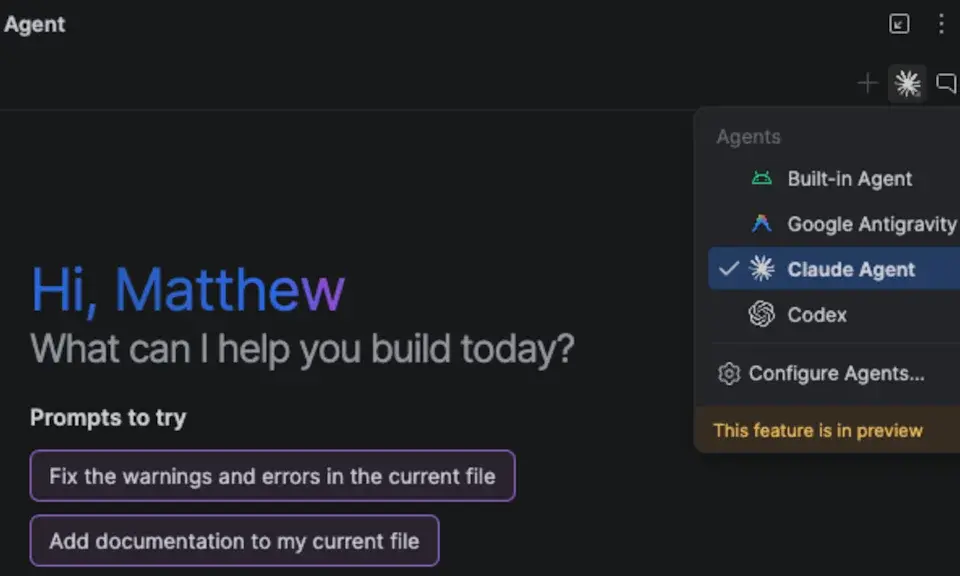
Google Introduces Bring Your Own Agent Feature
The new capability is called Bring Your Own Agent (BYOA). It allows developers to connect their preferred AI coding assistants directly to Android Studio.
Supported options include:
Anthropic Claude Agent
OpenAI Codex
Google Antigravity
More than 40 compatible AI coding agents
These tools can work with Android Studio's development environment and access useful project information, including source code structure, build configurations and development tools.
The integration uses the Agent Client Protocol (ACP), an open standard that allows compatible AI agents to communicate with supported development environments.
This approach gives developers more freedom to switch between different AI assistants without changing their entire development workflow.
Google has made the feature available in Android Studio Rabbit 2, allowing developers to install and manage compatible agents through the software's settings.

AI Agents Can Build, Test and Debug Android Applications
One of the most important parts of the update is the additional access AI agents receive inside Android Studio.
Instead of simply generating programming code, connected agents can interact with several development tools to help check whether their work functions correctly.
For example, an AI agent can:
Examine an application's project structure.
Understand existing source code.
Help identify programming errors.
Build and run Android applications.
Use the Android Emulator for testing.
Read Logcat information to investigate problems.
Review changes made to a project.
Access to the Android Emulator is particularly useful because developers can test applications in a virtual Android device without constantly switching between different tools.
Logcat also provides information about application activity and errors, helping AI assistants investigate issues that might otherwise require manual debugging.
This makes AI coding agents more useful throughout the development process, rather than limiting them to writing code.
Google Adds Change Review to Android Studio
Google is also introducing a feature called Change Review, designed to help developers understand and inspect modifications made by AI coding agents.
AI assistants can sometimes make changes across multiple files when completing a programming task. Reviewing all those modifications manually can become difficult, especially in larger applications.
Change Review helps developers examine the modifications and understand what an AI agent has changed.
This is important because AI-generated code still needs human supervision. Developers must be able to identify potential errors, review important changes and make sure the final application behaves as expected.
The feature aims to make AI-assisted development more transparent and manageable.
Google Brings Claude Code and Codex to Android CLI
Google is expanding AI integration beyond Android Studio's graphical interface.
The company's Android Command Line Interface (CLI) now includes official plugins for Claude Code and OpenAI Codex.
These integrations allow developers to use AI coding agents through terminal-based workflows while accessing Android development tools.
The Android CLI can help agents work with application projects, manage emulators and inspect application behaviour.
This is particularly useful for developers who prefer working through a terminal instead of relying entirely on a graphical development environment.
Google is effectively giving AI agents more access to the tools needed to build and maintain Android applications.
Google Demonstrates Faster Memory Leak Detection With Claude
Google has also shared an example showing how AI-assisted development tools could improve application debugging.
In one internal test, Claude Opus 5.5 was used to investigate memory leaks across 45 user journeys.
A memory leak occurs when an application fails to release memory it no longer needs. Over time, this can cause an app to slow down, consume excessive resources or crash.
According to Google's demonstration, the process took approximately 46 minutes with the Android CLI, compared with 88 minutes without it.
The improvement suggests that giving AI agents access to Android development tools could help developers investigate certain performance problems more efficiently.
However, this was a single test run for each setup, so the results should be considered an encouraging demonstration rather than proof that every debugging task will become faster.
Will This Make Android Apps Better?
Google's decision could eventually benefit Android users as well as developers.
AI coding agents can help developers identify bugs, inspect application performance and test features more efficiently. If these tools make it easier to detect problems before an app is released, users could eventually see more reliable applications.
However, AI tools cannot automatically guarantee better software.
Developers still need to review generated code, test applications on real devices and make decisions about which suggested changes should be implemented.
The biggest advantage is flexibility. Developers can now choose the AI assistant that best fits their workflow instead of depending on a single provider.
Final Thoughts
Google's decision to bring Claude, Codex and more than 40 AI coding agents into Android Studio marks an important development in Android app creation.
With the Bring Your Own Agent feature, Android developers have more freedom to choose their preferred AI tools while benefiting from Google's development environment.
The addition of Change Review and official Android CLI integrations also makes AI-assisted programming more practical.
As AI coding technology continues to improve, these tools could change how Android applications are built, tested and maintained.
For developers, the message is clear: Google wants Android Studio to become an open environment where different AI coding assistants can work together.
Leave a comment
Your email address will not be published. Required fields are marked *