

What Discs Can You Play on Xbox Series X?
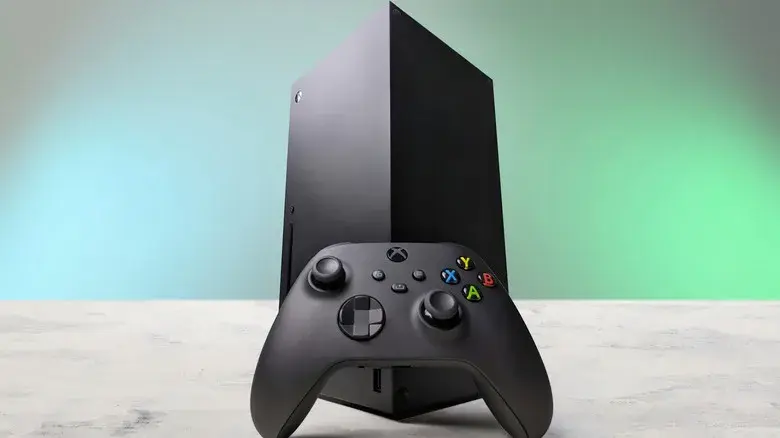
The Xbox Series X remains the better choice for gamers who prefer physical media. Unlike the Xbox Series S, the disc-equipped Series X includes a UHD Blu-ray drive, allowing users to play compatible physical games as well as DVD, Blu-ray, and 4K Ultra HD Blu-ray movies.
Microsoft also designed the Series X with backward compatibility in mind. Compatible games from Xbox One, Xbox 360, and the original Xbox can be played on the newer console, giving players access to games spanning multiple generations.
However, there are some important limitations. Not every older Xbox game works, and simply owning a physical disc does not guarantee compatibility.
Xbox One Game Discs on Series X
Most Xbox One games are compatible with Xbox Series X|S, although individual titles can have different compatibility features.
When you insert a supported Xbox One game disc into a Series X, the console can download and install the game to its internal storage. The disc then remains necessary as proof of ownership when you launch the game.
This means the disc doesn't necessarily contain everything the Series X needs to run the game. Instead, it can function as a license while the console installs the compatible game files.
Some supported titles can also benefit from improvements such as higher resolutions, better frame rates, HDR, or other Xbox enhancements.
Xbox 360 and Original Xbox Discs
The Series X also supports selected physical games originally released for Xbox 360 and the original Xbox.
The key word here is selected. Compatibility depends on whether Microsoft has included a particular game in its backward-compatible catalog.
If an older game is supported, inserting its disc can trigger a download of the compatible version. Once installed, the original disc generally needs to remain in the console whenever you want to play the game.
So, before buying an old Xbox 360 or original Xbox game specifically for Series X, it's worth checking Microsoft's backward-compatibility catalog first.
What About Kinect Games?
One notable limitation is Kinect.
Games that require the Xbox Kinect sensor aren't supported on Xbox Series X because the newer console does not support the Kinect hardware required for those experiences.
That means owning a physical copy of an older Kinect game doesn't necessarily make it playable on your Series X.
Xbox Series X as a Movie Player
The Series X isn't limited to gaming discs.
Its optical drive supports several popular physical movie formats, including:
| Disc Type | Xbox Series X |
|---|---|
| DVD | Supported |
| Blu-ray | Supported |
| 4K Ultra HD Blu-ray | Supported |
| Xbox One game discs | Supported for compatible titles |
| Xbox 360 game discs | Selected titles |
| Original Xbox game discs | Selected titles |
For movie playback, Microsoft's Blu-ray Player app can be used to play supported physical movie discs.
The inclusion of a UHD Blu-ray drive makes the Series X particularly useful for people who maintain a physical movie collection in addition to their game library.
Why Backward Compatibility Matters
Backward compatibility gives Xbox owners a way to continue using older games without necessarily purchasing them again digitally.
Microsoft says Series X|S backward compatibility supports selected Xbox 360 and original Xbox games alongside Xbox One titles. The company has also enhanced some older games with features such as FPS Boost, Auto HDR, and higher resolutions.
This can make older games feel considerably better on modern hardware.
For example, compatible titles may benefit from:
- Higher resolutions
- Improved frame rates
- Auto HDR
- Faster loading
- Better overall performance
- Modern Xbox features
However, enhancements vary from game to game.
How to Check If Your Disc Will Work
If you're unsure whether an older physical game is compatible, Microsoft's official backward-compatibility catalog is the safest place to check.
For Xbox One, Xbox 360, and original Xbox discs, compatibility is determined on a game-by-game basis. Microsoft specifically notes that features can vary between titles and that compatible disc-based games require a download.
The basic process is:
- Check the game in Microsoft's backward-compatibility catalog.
- Insert the physical disc into your Xbox Series X.
- Allow the console to download the required game files.
- Keep the disc inserted when playing if it is being used as the license.
Xbox Series X vs. Series S for Physical Games
The difference becomes especially important when choosing between Microsoft's two consoles.
The Xbox Series X includes a UHD Blu-ray drive, while the Xbox Series S is designed for digital gaming and does not play physical game discs.
| Feature | Xbox Series X | Xbox Series S |
|---|---|---|
| Physical game discs | Yes, compatible discs | No |
| Xbox One disc support | Yes | No |
| Xbox 360 disc support | Selected titles | No |
| Original Xbox disc support | Selected titles | No |
| 4K UHD Blu-ray | Yes | No |
| Digital games | Yes | Yes |
For players with a large collection of physical Xbox games, the Series X is therefore the more flexible option.
A New Disc-to-Digital Feature
Xbox is also experimenting with a feature that can give supported physical games a digital entitlement.
Microsoft announced in August 2026 that Xbox Insiders would begin testing a system allowing supported Xbox One and Xbox Series X disc-based games to receive digital entitlements. Microsoft said most Xbox One and Xbox Series X disc-based games support the feature, although not every title is included.
This is separate from normal backward compatibility and is part of Microsoft's broader effort to make physical game libraries easier to carry forward across its ecosystem.
Final Thoughts
The Xbox Series X is one of the most versatile Xbox consoles for physical-media owners. It can play most compatible Xbox One games, selected Xbox 360 and original Xbox titles, and physical DVD, Blu-ray, and 4K Ultra HD Blu-ray movies.
The biggest thing to remember is that not every older Xbox game is automatically compatible. Xbox 360 and original Xbox support depends on Microsoft's backward-compatible catalog, while compatible disc games generally need to be installed and require the physical disc to remain in the drive for authentication.
For gamers who have built a physical library over several generations, the Series X provides a convenient way to keep many of those games playable on modern hardware.
Để lại bình luận
Địa chỉ email của bạn sẽ không được công khai. Các trường bắt buộc được đánh dấu *